
Lighting problem after upgrading to 1.14.0 (Solved)

Hello.
Since I upgraded my Doomsday Engine to version 1.14.0, every time I activate the light by the IDBEHOLDL cheat code, the screen bleaches (Turns white) almost completely:
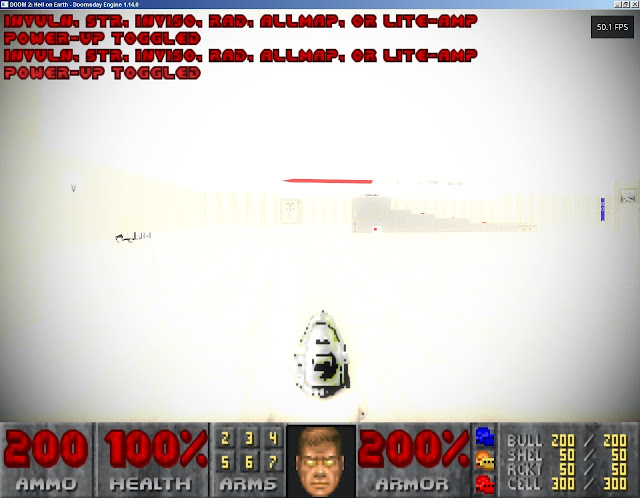
What causes this?
Since I upgraded my Doomsday Engine to version 1.14.0, every time I activate the light by the IDBEHOLDL cheat code, the screen bleaches (Turns white) almost completely:
What causes this?
Comments
With the current 1.13.2 version I have, I use custom appearance profile (Which probably have all of my settings from the control panel that I've setted with older versions that had a control panel). I think that these options weren't changed during upgrading to 1.14.0.
Where are the bloom settings? I don't find them.
Also, unrelated to this, the Print Screen key, isn't picked also in 1.14.0.
Bloom Threshold: 0.35
Bloom Intensity: 0.65
Bloom Dispersion: 1.00
I reseted the camera lens settings, and nothing changed, meaning that these are the default values.
I'm waiting for an answer.
This issue doesn't appear to occur for me, suggesting it could be an incompatibility with specific hardware.
Also, have you tried disabling bloom completely or tested using the 'Vanilla' Rendering profile? That disables the likes of bloom.
I found that there are no bloom settings in previous version 1.13.2.
Also, during the first run of Doomsday Engine 1.14 after upgrading from 1.13.2, a warning symbol appears on the upper right side of the screen.
Doomsday.out included if it is related to the problem:
Application path: D:\Old_D\wingames\Doomsday Engine\Bin\Doomsday.exe Created a new 32.0 MB memory volume. Config::read: Detected new build: 1109 => 1201 Executable: Doomsday Engine 1.14.0 (Stable 32-bit #1201) Apr 16 2014 13:04:46 RenderSystem: Loading shader definitions from read-only archive entry "data/renderer.pack/ shaders.dei" [path "/data/doomsday.pk3/data/renderer.pack/shaders.dei"] from archive in read-only "(basedir)\data\doomsday.pk3" OpenGL 3.3 supported Sys_GLInitialize: OpenGL information: Version: 3.3.0 Renderer: GeForce GT 220/PCIe/SSE2 Vendor: NVIDIA Corporation Capabilities: Compressed texture formats: 23 Available texture units: 4 Maximum texture anisotropy: 16 Maximum texture size: 8192 Line width granularity: 0.125 Line width range: 0.5...10 ^ : OpenGL Extensions: ^ : ARB extensions: arrays_of_arrays, base_instance, blend_func_extended, clear_buffer_object, color_buffer_float, compatibility, compressed_texture_pixel_storage, conservative_depth, copy_buffer, copy_image, debug_output, depth_buffer_float, depth_clamp, depth_texture, draw_buffers, draw_buffers_blend, draw_elements_base_vertex, draw_instanced, enhanced_layouts, ES2_compatibility, ES3_compatibility, explicit_attrib_location, explicit_uniform_location, fragment_coord_conventions, fragment_layer_viewport, fragment_program, fragment_program_shadow, fragment_shader, framebuffer_no_attachments, framebuffer_object, framebuffer_sRGB, geometry_shader4, get_program_binary, half_float_pixel, half_float_vertex, imaging, instanced_arrays, internalformat_query, internalformat_query2, invalidate_subdata, map_buffer_alignment, map_buffer_range, multi_bind, multisample, multitexture, occlusion_query, occlusion_query2, pixel_buffer_object, point_parameters, point_sprite, program_interface_query, provoking_vertex, robust_buffer_access_behavior, robustness, sample_shading, sampler_objects, seamless_cube_map, separate_shader_objects, shader_bit_encoding, shader_objects, shader_texture_lod, shading_language_100, shading_language_420pack, shading_language_include, shading_language_packing, shadow, stencil_texturing, sync, texture_border_clamp, texture_buffer_object, texture_buffer_range, texture_compression, texture_compression_rgtc, texture_cube_map, texture_cube_map_array, texture_env_add, texture_env_combine, texture_env_crossbar, texture_env_dot3, texture_float, texture_gather, texture_mirror_clamp_to_edge, texture_mirrored_repeat, texture_multisample, texture_non_power_of_two, texture_query_levels, texture_query_lod, texture_rectangle, texture_rg, texture_rgb10_a2ui, texture_stencil8, texture_storage, texture_storage_multisample, texture_swizzle, texture_view, timer_query, transform_feedback2, transform_feedback_instanced, transpose_matrix, uniform_buffer_object, vertex_array_bgra, vertex_array_object, vertex_attrib_binding, vertex_buffer_object, vertex_program, vertex_shader, vertex_type_10f_11f_11f_rev, vertex_type_2_10_10_10_rev, viewport_array, window_pos ^ : ATI extensions: draw_buffers, texture_float, texture_mirror_once ^ : EXT extensions: texture_env_add, abgr, bgra, bindable_uniform, blend_color, blend_equation_separate, blend_func_separate, blend_minmax, blend_subtract, compiled_vertex_array, Cg_shader, depth_bounds_test, direct_state_access, draw_buffers2, draw_instanced, draw_range_elements, fog_coord, framebuffer_blit, framebuffer_multisample, framebuffer_multisample_blit_scaled, framebuffer_object, framebuffer_sRGB, geometry_shader4, gpu_program_parameters, gpu_shader4, multi_draw_arrays, packed_depth_stencil, packed_float, packed_pixels, pixel_buffer_object, point_parameters, provoking_vertex, rescale_normal, secondary_color, separate_shader_objects, separate_specular_color, shader_integer_mix, shadow_funcs, stencil_two_side, stencil_wrap, texture3D, texture_array, texture_buffer_object, texture_compression_dxt1, texture_compression_latc, texture_compression_rgtc, texture_compression_s3tc, texture_cube_map, texture_edge_clamp, texture_env_combine, texture_env_dot3, texture_filter_anisotropic, texture_integer, texture_lod, texture_lod_bias, texture_mirror_clamp, texture_object, texture_shared_exponent, texture_sRGB, texture_sRGB_decode, texture_storage, texture_swizzle, timer_query, transform_feedback2, vertex_array, vertex_array_bgra, import_sync_object ^ : EXTX extensions: framebuffer_mixed_formats ^ : IBM extensions: rasterpos_clip, texture_mirrored_repeat ^ : KHR extensions: debug ^ : KTX extensions: buffer_region ^ : NV extensions: blend_square, conditional_render, copy_depth_to_color, copy_image, depth_buffer_float, depth_clamp, ES1_1_compatibility, explicit_multisample, fence, float_buffer, fog_distance, fragment_program, fragment_program_option, fragment_program2, framebuffer_multisample_coverage, geometry_shader4, gpu_program4, gpu_program4_1, half_float, light_max_exponent, multisample_coverage, multisample_filter_hint, occlusion_query, packed_depth_stencil, parameter_buffer_object, parameter_buffer_object2, path_rendering, pixel_data_range, point_sprite, primitive_restart, register_combiners, register_combiners2, shader_buffer_load, texgen_reflection, texture_barrier, texture_compression_vtc, texture_env_combine4, texture_expand_normal, texture_multisample, texture_rectangle, texture_shader, texture_shader2, texture_shader3, transform_feedback, transform_feedback2, vertex_array_range, vertex_array_range2, vertex_buffer_unified_memory, vertex_program, vertex_program1_1, vertex_program2, vertex_program2_option, vertex_program3 ^ : NVX extensions: conditional_render, gpu_memory_info ^ : S3 extensions: s3tc ^ : SGIS extensions: generate_mipmap, texture_lod ^ : SGIX extensions: depth_texture, shadow ^ : SUN extensions: slice_accum ^ : WGL extensions: EXT_swap_control ^ : WIN extensions: swap_hint ^ : Extensions (WGL): ^ : WGL extensions: ARB_buffer_region, ARB_create_context, ARB_create_context_profile, ARB_create_context_robustness, ARB_extensions_string, ARB_make_current_read, ARB_multisample, ARB_pbuffer, ARB_pixel_format, ARB_pixel_format_float, ARB_render_texture, ATI_pixel_format_float, EXT_create_context_es_profile, EXT_create_context_es2_profile, EXT_extensions_string, EXT_framebuffer_sRGB, EXT_pixel_format_packed_float, EXT_swap_control, EXT_swap_control_tear, NVX_DX_interop, NV_DX_interop, NV_DX_interop2, NV_delay_before_swap, NV_float_buffer, NV_multisample_coverage, NV_render_depth_texture, NV_render_texture_rectangle FMOD Sound System (c) Firelight Technologies Pty, Ltd., 1994-2013 Audio configuration: CD: FMOD/CD Music: FMOD/Ext SFX: FMOD Initialized 5 sound effect channels Music disabled User-supplied IWAD path: "D:/Old_D/wingames/Doomsday Engine/data/jdoom/Doom main wads/" User-supplied IWAD path: "D:/Old_D/wingames/Doomsday Engine/snowberry/" Locating "HACX - Twitch 'n Kill"... ! hacx.wad: missing - libdoom.pk3: "(basedir)\data\jdoom\libdoom.pk3" => Not playable (incomplete resources) Locating "Chex(R) Quest"... ! chex.wad: missing - libdoom.pk3: "(basedir)\data\jdoom\libdoom.pk3" => Not playable (incomplete resources) Locating "Final DOOM: TNT: Evilution"... - tnt.wad: "(basedir)\data\jdoom\Doom main wads\tnt.wad" - libdoom.pk3: "(basedir)\data\jdoom\libdoom.pk3" => Playable Locating "Final DOOM: The Plutonia Experiment"... - plutonia.wad: "(basedir)\data\jdoom\Doom main wads\plutonia.wad" - libdoom.pk3: "(basedir)\data\jdoom\libdoom.pk3" => Playable Locating "DOOM 2: Hell on Earth"... - doom2.wad or doom2f.wad: "(basedir)\data\jdoom\Doom main wads\DOOM2.WAD" - libdoom.pk3: "(basedir)\data\jdoom\libdoom.pk3" => Playable Locating "Ultimate DOOM"... - doom.wad or doomu.wad: "(basedir)\data\jdoom\Doom main wads\DOOM.WAD" - libdoom.pk3: "(basedir)\data\jdoom\libdoom.pk3" => Playable Locating "DOOM Registered"... - doom.wad: "(basedir)\data\jdoom\Doom main wads\DOOM.WAD" - libdoom.pk3: "(basedir)\data\jdoom\libdoom.pk3" => Playable Locating "DOOM Shareware"... ! doom1.wad: missing - libdoom.pk3: "(basedir)\data\jdoom\libdoom.pk3" => Not playable (incomplete resources) Selecting game 'doom2'... Path "auto" now mapped to "data\jdoom\auto" Path "auto" now mapped to "defs\jdoom\auto" Loading game resources... IWAD identification: 0x10424c4 ResourceSystem > loadCompositeTextureDefs: Loaded all 428 texture definitions from "(basedir)\data\jdoom\Doom main wads\ DOOM2.WAD:(basedir)\TEXTURE1.lmp" Parsing primary config "configs\doom\game.cfg"... game-fastmonsters: unknown identifier configs\doom\game.cfg(110): error executing command "game-fastmonsters 0" game-save-auto-loadonreborn: unknown identifier configs\doom\game.cfg(146): error executing command "game-save-auto-loadonreborn 0" net-master-address: unknown identifier configs\doom\game.cfg(738): error executing command "net-master-address "www.dengine.net"" net-master-path: unknown identifier configs\doom\game.cfg(741): error executing command "net-master-path "/master.php"" net-master-port: unknown identifier configs\doom\game.cfg(744): error executing command "net-master-port 0" CVar_SetFloat2: Texture gamma correction set to 0.750 ui-cursor-height: unknown identifier configs\doom\game.cfg(1248): error executing command "ui-cursor-height 0.75" ui-cursor-width: unknown identifier configs\doom\game.cfg(1251): error executing command "ui-cursor-width 0.75" Def_Read: Parsing definition files... ^ : Definitions: ^ : 30 animation groups 6 composite fonts 11 finales 9 lights 33 map infos 11 materials 27 particle generators 3 skies 36 songs 110 sound effects 138 sprite names 974 states 51 surface decorations 368 text strings 11 texture environments 140 things ResourceSystem: Model init completed in 0.00 seconds Available maps: MAP01 data\jdoom\Doom main wads\External Wads\DM2COLL.WAD MAP02-MAP32 data\jdoom\Doom main wads\DOOM2.WAD Turbo scale: 400% Autostart in Map MAP16, Skill 3 DOOM 2: Hell on Earth Starting tutorial (not shown before) Game begins... Starting music 'dead2' Loading map "MAP16"... Current map elements: 778 Lines 142 Sectors 951 Vertexes Sector #8 is unclosed near (1280, 112) Forced pause for 28 tics Map: MAP16 - Suburbs Author: id Software MasterWorker: Received 2 servers from master Very Happy Ammo added Degreelessness Mode On No clipping mode ON Maximum zoom ON in automap inVuln, Str, Inviso, Rad, Allmap, or Lite-amp Power-up toggledMotherboard: Gigabyte GA-G41M-ES2L rev 1.0
CPU: Intel Pentium DualCore E5400 2700MHz
GPU: NVIDIA GeForce GT 220 (1GB memory)
Memory: 2GB
Monitor: TEAC 7005L12 17" 4:3 LCD Monitor
HDD: 500GB (Two partitions of 250GB).
I disabled the bloom, and didn't help.
Update 27.4.2014: I now in my father computer, and Doomsday engine 1.14.0 have the same bleached screen. So I chose the Vanilla rendering profile, and it solved the screen bleaching, especially when choosing a lower gamma correction. But with this setting, light sources, don't causes light reflection on the walls, and the custom profile, cause the game to crash without any error message, when I try to edit it, regardless if the version is 1.40 or 1.13.2.
Please help!
My father computer specification:
Mother board: Gigabyte GA-H55M-D2H rev 1.4
Memory: 2GB
CPU: DualCore Intel Core i3-540, 3066 MHz
Onboard GPU: Intel HD Graphics
HDD: Western Digital Caviar Green WD10EARS 1GB SATA-II / 64MB Cache (Two partitions of 500MB
Display: Samsung SyncMaster 2253LW LCD display
Once again posting my computer specification to prevent a mess in this theard (This theard contains other unrelated problems which are specific to the Doomsday Engine on my father computer only, which I plan to post about them on a new thread [Please ignore the crashing problem that I posted here]):
My computer specification:
Motherboard: Gigabyte GA-G41M-ES2L rev 1.0
CPU: Intel Pentium DualCore E5400 2700MHz
GPU: NVIDIA GeForce GT 220 (1GB memory) (I replaced it recently to 9800GT [1GB memory])
Memory: 2GB
Monitor: TEAC 7005L12 17" 4:3 LCD Monitor
HDD: 500GB (Two partitions of 250GB)
For some reasons, I can't attach files to my comments, but only copy and paste their contents (I'm using Firefox 28.0).
Btw, why all of the technical folders of Doomsday Engine (Including the runtime one), located at the users folder and not at the folder of Doomsday Engine?
Strange that this didn't did anything in my father computer (I didn't tryed 1.14.1 on it yet). Probably this was a problem in 1.14.0, or my father computer specification wasn't compatible?
You should set rend-tex-gamma to 0 in the console ("rend-tex-gamma 0"). If you need to adjust display gamma or contrast, go instead to taskbar -> Video Settings -> Color Adjustments.